

Service · beta
Lead Check
Every day we check that leads from your website actually reach you. If something breaks, you find out the same day, not a week later.
We're testing the service right now. The bot speaks Russian and is built for Russian-language sites — feedback is very welcome.
The form looks fine, but leads get lost
A broken webhook
The CRM changed its API or a token expired: the site says “Thank you”, but no deal is created.
Emails land in spam
Mail or domain settings changed, and leads quietly pile up where nobody looks.
A plugin update
After a site update the form stopped submitting, and nobody noticed.
The CRM itself fails
The form works and the deal is created, but the CRM doesn't fire the webhook, so the lead never reaches your telephony, spreadsheet or bot.
How it works
- Add your site in the botGive it the page with the form. The bot finds the form and works out which fields to fill.
- Choose where leads arriveA CRM webhook or email forwarding: the bot explains how to set up a rule for your mail service, so only test emails are forwarded.
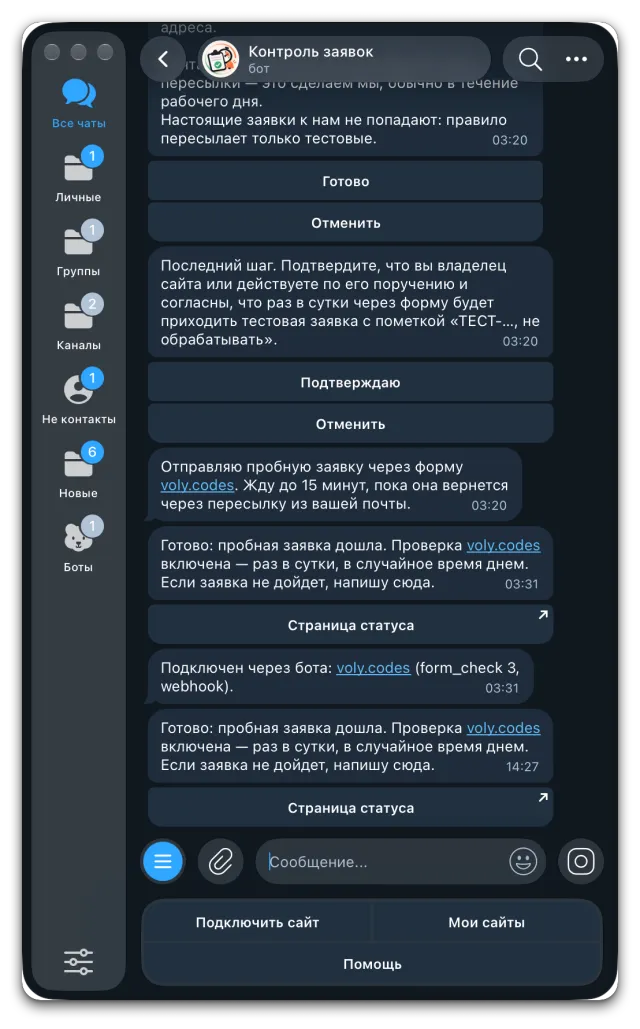
- A trial leadThe bot sends a trial lead right away and turns the check on only once it has arrived.
- A daily checkAt a random time during the day a lead marked “TEST-…, do not process” comes in. If it doesn't arrive, you get a Telegram message.
Status page
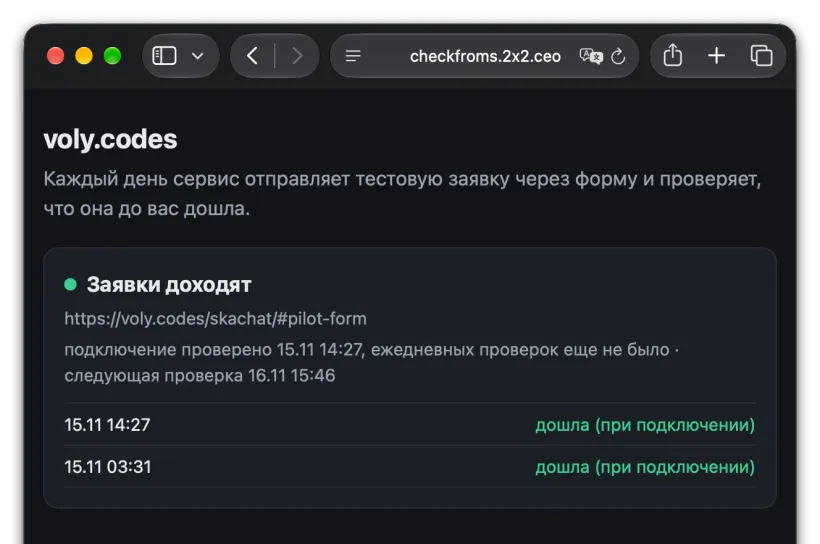
Every site gets its own page: whether the last lead arrived, when the next check runs, and the recent history. You can share it with colleagues or your contractor.
Supported forms
- Plain HTML forms, Contact Form 7 (WordPress) and JSON forms are submitted directly: fast and without a browser.
- Tilda, quizzes and JavaScript forms are filled in by a real browser, just like a visitor would. The bot closes cookie banners by itself.
- Leads are received via a CRM webhook or forwarded email: Gmail, Yandex Mail, Mail.ru and mail on your own domain.
Bitrix24 and amoCRM
The bot recognizes forms from these CRMs by itself, with nothing to configure. It walks you through returning the label from the CRM step by step.
Bitrix24
A CRM form on your site or a Bitrix24 landing page. The bot ticks the consent box and skips phone and email, so the test lead isn't merged into an old deal. The label comes back via the “Outgoing webhook” automation rule on the first stage.
amoCRM
A form from the amoCRM form builder, on its own page or embedded in your site. The label comes back via the account webhook from amoMarket on the “Contact added” event.
Honest checks
- Success means the lead reached your CRM or inbox. A “Thank you” message on the site or analytics requests don't count as a submission.
- A check is enabled only after a trial lead has arrived, so setup verifies the whole path at once.
- When something breaks, the message says where: the form didn't submit, or it submitted but the lead never arrived. Different causes, different people to fix them.
- CRMs fail too: during an amoCRM test, one evening deals were being created but the webhook never fired. The service caught it with the very first test lead.
How we caught the amoCRM webhook outage — write-up on vc.ru (in Russian) →
Careful with your site
- One lead a day, always marked “TEST-…, do not process”, so managers know to skip it.
- The service never sees real leads: the mail rule forwards only test emails.
- Only the site owner, or someone acting on their behalf, can connect a site; this is confirmed in the bot.
- If you track goals in Yandex Metrica, the bot explains how to exclude the service's address so test leads don't skew your stats.
Try it on your site: setup takes a few minutes.
Open the Telegram botDeveloper — 2x2.ceo · Maksim Lanies